
Aero-Inspired Dark Chrome Theme
Overview
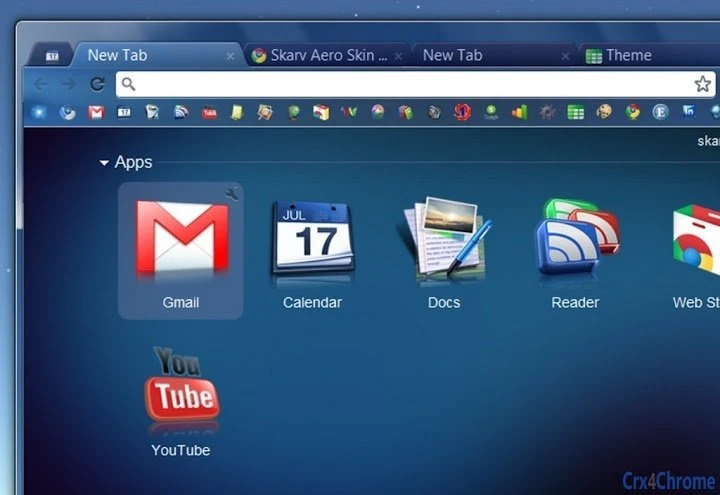
The Aero Skin theme is a visually refined browser interface designed for Chrome users seeking a modern, immersive experience. With a dark and bluish color palette, it enhances visual comfort while maintaining readability and aesthetic appeal. The theme is optimized for 1080p HD resolution (1920×1080), ensuring crisp visuals on standard widescreen displays. It supports both Windows and Mac platforms, making it accessible to a broad user base. The theme is particularly suited for professionals and casual users who spend extended time browsing and value a clean, distraction-free interface.
Developed by Skarv, the theme has earned recognition through the "Famous Software Award" by Download.FamousWhy.com, highlighting its quality and user appeal. Its design draws inspiration from Microsoft's Aero aesthetic, blending transparency effects with deep blues and subtle gradients. This makes it ideal for users who appreciate a sleek, high-end look without altering core browser functionality. Real-world use cases include long reading sessions, content creation workflows, and multimedia consumption where visual fatigue reduction is beneficial.
Key Features & Capabilities
- Dark and Bluish Color Scheme – Reduces eye strain during prolonged use, especially in low-light environments.
- 1080p HD Resolution Support – Optimized for 1920×1080 displays with 16:9 aspect ratio for sharp, consistent visuals.
- Aero-Inspired Design Elements – Features subtle transparency and gradient effects reminiscent of Windows Aero aesthetics.
- Platform Compatibility – Works on both Windows and Mac systems, providing a consistent experience across devices.
- Lightweight Installation – At just 1.2 MB, it consumes minimal system resources and installs quickly.
Users can apply the theme directly through Chrome’s theme gallery, making setup straightforward. The design is ideal for individuals who want to personalize their browsing environment without compromising performance. The theme’s focus on visual harmony and usability makes it suitable for daily use in both work and leisure contexts.
User Interface, Workflow & Performance
The user interface of Aero Skin is minimal and intuitive, aligning with Chrome’s native design language. Upon activation, the theme transforms the browser’s toolbar, tab bar, and new tab page into a cohesive dark blue aesthetic. Navigation remains fully functional, with no changes to core browser behavior or layout structure. The workflow remains unchanged, allowing users to access bookmarks, extensions, and settings without disruption.
Performance details were not specified by the developer. However, given its lightweight nature (1.2 MB), it is expected to have negligible impact on system resources. The theme does not introduce additional processes or background tasks, which supports smooth operation. Stability is assumed to be high, as it is a static visual overlay rather than a dynamic application. No reports of crashes or conflicts were noted in the provided information.
Compatibility & System Requirements
Aero Skin is compatible with both Windows and Mac operating systems. It is designed to function within the Chrome browser environment and does not require additional software or plugins for basic operation. The installation size is 1.2 MB, which is small and efficient for a visual theme.
Exact system requirements were not listed. The developer did not provide additional system requirements beyond platform support. Compatibility with specific Chrome versions was not specified. Users are advised to ensure their Chrome browser is up to date to avoid potential issues. Performance observations are based on general software behavior patterns.
Pros and Cons
Pros
- Visually striking dark blue theme with Aero-inspired design
- Optimized for 1080p HD displays
- Lightweight at just 1.2 MB
- Available for both Windows and Mac
- Free to download and use
Cons
- No advanced customization options provided
- Specific Chrome version compatibility not disclosed
- Performance impact details not available
- Only supports static visual changes, no functional enhancements
- Additional extensions recommended for touchscreen users
FAQ Section
Is Aero Skin compatible with my operating system?
The theme is designed for both Windows and Mac platforms. Users on either system can install it through the Chrome browser.
Can I use this theme on older versions of Chrome?
Specific compatibility with Chrome versions was not provided. It is recommended to use the latest version of Chrome for optimal performance.
Is the theme safe to install?
As a browser theme distributed through official channels, it poses no known security risks. It does not collect data or modify system files.
Does the theme require an internet connection to work?
Once installed, the theme functions offline. However, initial installation and updates require an internet connection.
Can I customize the theme colors or layout?
Customization options were not specified. The theme offers a fixed visual design without user-adjustable parameters.
Final Thoughts
Aero Skin delivers a polished, visually engaging experience for Chrome users who appreciate a sleek, modern interface. Its dark and bluish palette, combined with Aero-inspired elements, offers both aesthetic appeal and practical benefits like reduced eye strain. The theme is lightweight, fast to install, and works across Windows and Mac systems.
While it does not offer functional upgrades, its focus on visual refinement makes it a strong choice for users seeking a more immersive browsing environment. The recognition from Download.FamousWhy.com adds credibility to its quality. For those looking to enhance their Chrome interface with a professional-grade theme, Aero Skin is a compelling option.
Download Aero Skin now.







